I know there's been a lot of talk around the forum now about uploading images to this forum without using outside sources like imageshack, photobucket, etc. Well I'm making this post to share with you all on how to go about uploading pics to your posts without using a site like that, well sort of. We do use a third party site, but it's 10 times easier than using a site like those mentioned earlier. So, I'll give you step by step instructions on how to go about doing so, using pictures to help you along the way.
1. Click on button with picture of an image and hard disk.

2. A box pops up. Click on the small, blue text link that reads "Subscribe."

3. Click on the "join for free" text link.

4. Fill in your account information.

5. Now your account has been created! Check your email you signed up with to activate your account. Remember, this site is safe, secure, and won't sell your information (name, email address, etc.) to anyone!

6. Now that your account is created and activated you can start uploading pics! To do this, click on the same small button you clicked on in step 1. This time, fill in your email address and password you chose for your free account!
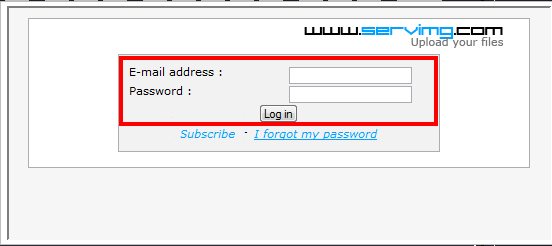
7. Once your signed in (you may or may not have to sign in to the picture hosting site each time you log on to the forum) you can start uploading pics by clicking the browse button, and finding the desired picture you want to upload. Select that picture and click "open."

8. Once your file is chosen, select what size you want the picture to show up as. Recommended is 640, but please, nothing over 800. click "Host it."

9. Next, you will be presented with three areas of text to choose from.
You'll want to copy and paste the middle one, under the caption "Image," into your post, wherever desired. It'll paste as only letters and numbers until you either hit the "Preview" or "Send" button.
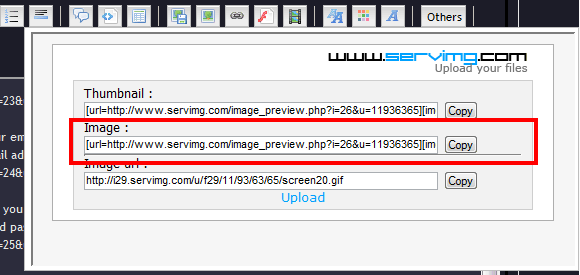
10. Now you are done! As far as I know, you can host unlimited pictures through servimg.com - so start uploading! If you want to upload a second picture from your current screen after uploading your first, simply click the "upload" button underneath the three areas of text you previously chose from. It'll take you back to your starting screen where you can upload pics from.

11. Also, if you want to minimize the upload screen, simply click the main button you clicked to get the whole uploading process started (button with picture of an image with a hard disk in front of it).

Alright, well I hope that helps clear things up a little! If you're still confused, simply PM me or another moderator to get some help! Thanks everyone!



 Subject: How to upload images to forum
  Tue Feb 19, 2008 2:49 am


